DAS Trader Pro trading journal for Excel & Google Sheets
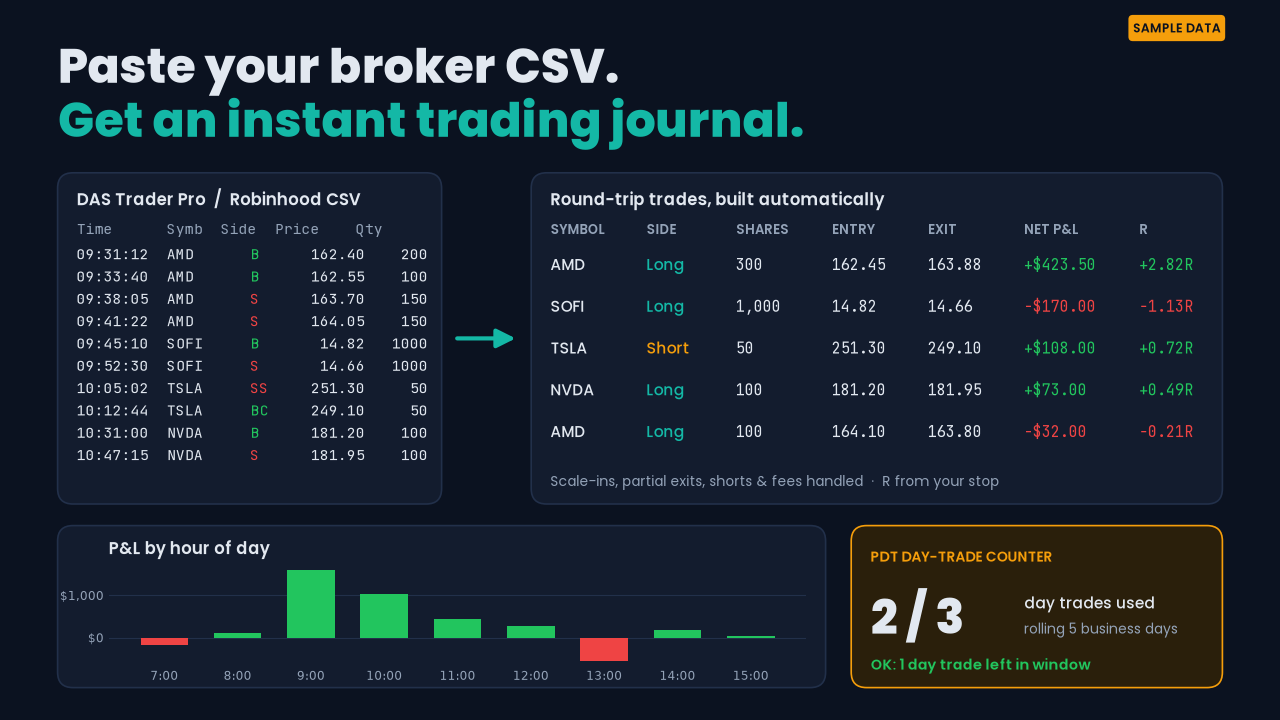
DAS Trader Pro has no built-in journal. TapeLog takes the CSV from the DAS Trades window and turns your fills into round-trip trades with stats.
How the DAS import works
- In DAS Trader Pro, open the Trades window, right-click, and export to CSV.
- Paste it into TapeLog's Import tab, choose the DAS preset, and set the trade date. The Trades window holds one day and has no date column.
- TapeLog reads
Time, Symb, Side, Price, Qtyand optionallyEcnFees. Sides B, S, SS and BC are supported, so you get longs, shorts, scale-ins and partial exits. - The Dashboard updates: win rate, profit factor, expectancy, average R, max drawdown, and P&L by setup, hour, weekday and ticker.
Works with brokers that use the DAS Trader Pro platform, as long as the export has the standard columns. Want to do it by hand? Read the step-by-step guide.